Remote For Samsung Smart TV
- 4.3
- Rating
- 10.00M
- Installs
- Free
- Price
 Analysis by App-foxy
I reached for Remote For Samsung Smart TV in the kind of situation where a missing remote turns a simple evening into a search through sofa cushions, drawers, and yesterday’s laundry. The app is designed for Samsung television owners who want to use a phone as a replacement controller, and its appeal is easy to understand: the phone is usually nearby even when the physical remote is not.
After using it as a practical tool rather than treating it like a novelty, I found that its value depends on one basic question: does your phone and television work together smoothly on your home network? When the connection behaves, the app makes everyday control much less annoying. When setup or discovery gets in the way, a physical replacement remote can still be the calmer choice.
From a missing remote to a working television
The app comes from ControllaTV and sits in the tools category. It is free to install, with optional in-app purchases ranging from $8.99 to $44.99 per item. That makes it easy to try before deciding whether the extra functions or a more complete experience are worth paying for. Its Everyone age rating also makes it suitable for a household where different family members may need to use the television.
You May Also Like

 Blood Strike: 2.5 Anniversary
Blood Strike’s Loadouts Turn Every Drop Into a Tactical Gamble
A close look at Blood Strike’s custom loadouts: how fast access to signature weapons reshapes its battle royale rhythm, rewards preparation, and narrows the gap between fights.

 Pandora - Music & Podcasts
Pandora’s Music Is Easy to Start, but Harder to Recover
Pandora’s strength is its low-effort path from a seed to a station. Its weak spot is how much confidence it asks you to place in connection, setup, and quiet recovery.

 8 Ball Pool
 Is Built on Rivalries, Rematches, and Routine
A close look at the rivalries, rematches, shared routines, and unanswered safety questions that turn a quick pool match into a persistent mobile community.

 Samsung Music
’s Quiet Strength Is Playing What You Already Own
Its reach comes less from spectacle than from dependable access to a personal library. That simplicity is both the app’s strongest retention engine and its ceiling.

 AccuWeather: Weather Radar
AccuWeather Review: A Quick, Clear Forecast for Everyday Decisions
For everyday plans, the best forecast is the one you can understand quickly. AccuWeather makes rain timing, radar, and local conditions easy to act on, with a few trade-offs.

 Hill Climb Racing
Why Hill Climb Racing Still Turns Crashes Into One More Run
A tiny car, a bumpy hill and one more upgrade: Hill Climb Racing keeps resurfacing because its simple chaos makes every near-miss feel personal.
More From Our News Desk



The first useful habit is to install it before an emergency. If the remote has already disappeared and the television is sitting on a different network or waiting for a confirmation step, frustration arrives quickly. Installing it while the original controller still works gives you time to check the connection and learn the layout without a program playing in the background.
I would begin by placing the phone and Samsung TV on the same home network, then opening the app and allowing it to search for the television. The important handoff happens here: the phone sends the request, the TV appears as the intended destination, and you select the correct screen if more than one Samsung set is available. In a home with several televisions, naming or identifying them by room in your own routine is especially helpful, because choosing the wrong screen can look like a failed connection when the app is actually controlling another TV.
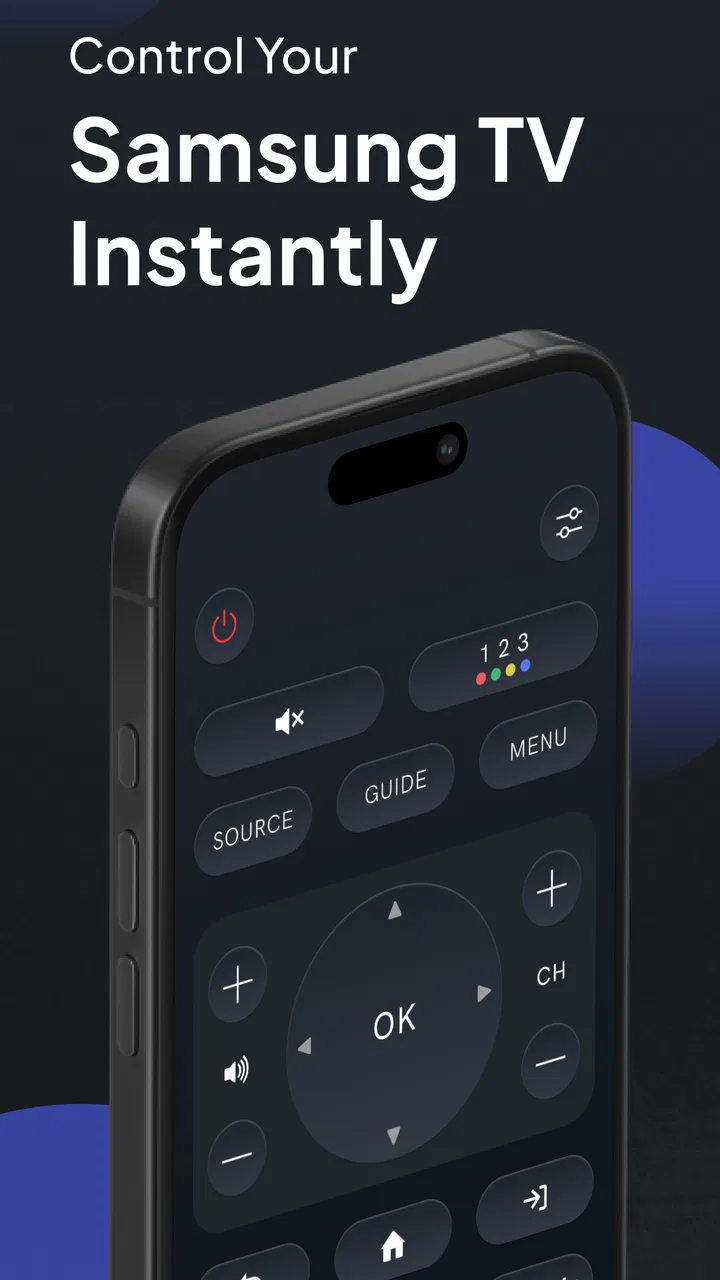
Once the television is selected, I treat the phone as the control surface rather than assuming it will feel exactly like Samsung’s physical remote. Touch controls are convenient for quick actions, but they change the rhythm of navigation. A thumb can move through menus, select an item, return to the previous screen, and adjust volume without looking for separate buttons. On the other hand, a glass screen does not provide the same tactile landmarks as a remote, so blind operation takes practice.
What the everyday control flow feels like
A realistic use case is a family television in the living room. Someone has placed the physical remote under a cushion, a child has lowered the volume, and I want to resume a show without interrupting the search. I open the app, choose the living-room television, and use the on-screen controls to wake or manage the set if the connection allows it. From there, volume and basic navigation are faster than moving furniture around.
The strongest part of this workflow is not any single button. It is the reduction of small interruptions. The phone is already in my hand, so changing the volume or moving through a menu does not require a separate object. That is useful when the remote is misplaced temporarily, when the batteries are exhausted, or when one remote has to serve several Samsung televisions.
Using one phone with multiple sets is also where the app becomes more practical than a simple emergency substitute. In a home with a bedroom television and a living-room television, the handoff between devices matters more than the first connection. I would check the selected TV before pressing controls, especially if both sets are powered on. A wrong selection can produce the confusing impression that volume or navigation is unresponsive.
For text entry, a phone may be more comfortable than repeatedly pressing directional buttons on a conventional remote, depending on how the app presents the available controls and how the television handles input. I would use the phone keyboard when it appears as part of the interaction, but I would not assume every Samsung screen or every input field behaves identically. Some television menus are designed around a remote’s directional navigation, and those screens can still feel slower on a touch display.
The handoffs that decide whether it works well
The first handoff is between the app and the home network. If the phone is using mobile data while the television is on Wi-Fi, discovery may fail even though both devices are connected to the internet. Guest networks, range extenders, and routers that isolate wireless devices can create the same symptom. Before blaming the app, I would put both devices on the ordinary home network and try again.
The second handoff is between the phone and the selected television. A household with multiple Samsung TVs needs a careful selection habit. I would turn on only the target screen during initial setup if possible, then test volume or navigation immediately. That quick test confirms that the connection is going to the right room before I rely on the app from the sofa.
The third handoff involves the person using the phone. A physical remote can be passed around without much explanation, while a phone-based controller is tied to the device that has the app installed. If several people regularly control the same television, it is worth setting up the app on the phones that will actually be used instead of assuming one person will always be available.
There is also a practical handoff between control and attention. A phone is full of distractions, notifications, and unrelated apps. It can be faster than a remote for a one-off adjustment, but it can also encourage someone to unlock the phone, open the controller, and then drift into another task. For long viewing sessions, a dedicated physical remote remains more immediate.
Small habits that improve the experience
My first tip is to test the app while the television is already on and displaying a simple screen. That separates connection problems from power-state problems. If basic navigation works in that condition, I know the phone and TV can communicate before testing more demanding situations.
My second tip is to keep the app available on the phone that usually stays in the living room. This sounds obvious, but a remote replacement is most useful when it is reachable without a second search. A shortcut or an easy-to-find app position can matter more than learning every control.
My third tip is to use the app as a backup for shared spaces rather than immediately throwing away every physical remote. The phone is excellent when the original controller is missing, but a physical remote is still valuable during router problems, phone battery trouble, or moments when several people need control at once.
A fourth useful approach is to establish a quick recovery routine. If the television is not found, I would check the network first, close and reopen the app, verify that the intended TV is powered on, and then repeat discovery. If multiple televisions are present, I would confirm the selected device instead of repeatedly tapping the same control. This order avoids wasting time on random button presses.
Where it is stronger than the usual alternatives
Compared with buying a replacement remote, the app is more convenient when the phone is nearby and the television is already connected to the home network. There is no separate object to store, and one phone can serve more than one Samsung TV. That is a meaningful advantage in homes where remotes regularly migrate between rooms.
Compared with a universal physical remote, the app has less hardware clutter and can be tried immediately. A universal remote may require codes, pairing, or a trip to a store, while the phone is already part of daily life. The trade-off is that the app depends on the phone, its battery, the network, and a successful device connection.
Compared with Samsung’s original remote, this app is best understood as a convenient substitute rather than a perfect duplicate. The original controller is purpose-built, tactile, and ready without unlocking a screen. The phone app wins when the original is lost or when several televisions need to be managed from one device, but it may lose for rapid blind operation and dependable use during network trouble.
The app’s popularity suggests that this replacement model solves a common household problem. It has an average rating of 4.3 from around 233 thousand ratings, with over 10 million installs. I read those figures as evidence of broad usefulness, not as a guarantee that every Samsung setup will behave the same way. Network layout, television model, phone behavior, and the number of TVs in the home all affect the experience.
Where the workflow breaks
The most obvious breaking point is network discovery. If the phone cannot see the television, the rest of the controls are irrelevant. This is why I would not recommend the app as the only way to operate a television in a home with an unreliable router or strict network separation. A physical remote is safer in that situation.
Another weak point is dependence on the phone’s condition. A nearly empty battery, a locked device, a damaged screen, or a phone being used by someone else can make the controller unavailable. The app removes the need to find one object, but it does not remove the need to have a working control device.
Touch operation can also be less satisfying for people who change channels, adjust volume, or move through menus without looking. There is no physical click to confirm that a button was pressed. I found that this matters most in a dark room, where finding the correct area on a phone can be less natural than feeling a familiar remote.
Multiple-TV homes introduce another kind of friction. The ability to control several Samsung televisions is useful, but it also creates room for mistakes. If the wrong set is selected, the app may appear unreliable even though it is doing exactly what it was told to do. I would treat room identification as part of the setup, not as a minor detail.
The free entry point is helpful, but people should pay attention before committing to optional purchases. The listed purchase range reaches from $8.99 to $44.99 per item, so the cost can become significant depending on which option is chosen. I would first confirm that the basic connection solves the actual problem, then decide whether any paid addition is justified by regular use.
Who should use it and who should skip it
I would recommend this app to Samsung TV owners who frequently misplace remotes, manage more than one television, or want a backup controller on a phone. It is also a sensible choice for a shared living space where the physical remote is often carried into another room. The free installation makes testing relatively straightforward, provided the home network is suitable.
I would be more cautious about recommending it to someone who wants a controller that works regardless of Wi-Fi, someone who dislikes operating devices through a touchscreen, or someone who needs a dependable control method during router outages. For those users, a replacement Samsung remote or a compatible universal remote is likely the better primary solution.
It is also not the best fit if only one person owns the phone and the television is used by a large household. The app can still help, but the social workflow becomes awkward when everyone must ask for access to one device. In that case, keeping a physical remote available provides a smoother handoff between viewers.
Version, support expectations, and daily reliability
The current version is 1.38, and the app runs on Android 7.0 or later. That broad compatibility makes it accessible to people who are not using a recent phone, although real-world smoothness still depends on the handset and the television connection. I would keep the app updated when updates are available, especially for a tool whose main job is device communication.
Because this is a remote-control utility, reliability matters more than visual novelty. I care about whether the correct television is found, whether commands reach it promptly, and whether I can recover from a failed connection without starting over. The best experience is almost invisible: open the controller, choose the TV, make the adjustment, and put the phone down.
My overall result is positive, with a clear boundary. Remote For Samsung Smart TV turns a phone into a useful fallback and can become a practical multi-TV controller when the network and device selection are handled carefully. It does not replace the certainty of a physical remote in every situation, but it can save a surprising amount of time in ordinary household moments.
My recommendation is to try it as a backup first, then promote it to your main controller only after it proves reliable with your specific Samsung television. That approach gives you the convenience of phone-based control without depending on it before you know how the connection behaves. For the right home, it is a simple solution to a recurring nuisance; for a network-sensitive or touch-averse household, a physical remote remains the more dependable answer.
FAQs for Remote For Samsung Smart TV
01What is Remote For Samsung Smart TV, and how does it work?
Remote For Samsung Smart TV is a mobile application designed to control compatible Samsung televisions from an Android or iOS device. After installing it, you typically connect your phone and TV to the same Wi-Fi network, open the app, and select the television it discovers. The available controls may include navigation buttons, volume, channel selection, power, input switching, and sometimes a touchpad or keyboard.
02Is Remote For Samsung Smart TV compatible with every Samsung television?
Compatibility depends on the specific app version, television model, operating system, and network configuration. It generally works best with newer Samsung Smart TVs that support network-based remote control, while older models may require infrared hardware or may not be supported at all. Before downloading, check the app listing for supported devices and confirm that your TV is a Smart TV with the required connectivity features.
03Does my phone and Samsung TV need to be connected to the same Wi-Fi network?
In most cases, yes. Network-based remote apps usually require the smartphone and Samsung TV to be connected to the same local Wi-Fi network so they can detect and communicate with each other. If the television does not appear, check that both devices are using the same network rather than separate guest connections, disable mobile data temporarily, and restart the app or router if necessary.
04Can I use the app if my original Samsung remote is lost or not working?
The app can be a useful replacement for many everyday functions, especially when the television is already connected to Wi-Fi and can be discovered by the phone. However, initial setup may be difficult if the TV is offline or requires an on-screen permission code that you cannot confirm without a physical remote. Some features may also be limited compared with Samsung’s original remote.
05Is Remote For Samsung Smart TV free and safe to download?
Many remote-control apps can be downloaded for free but may include advertisements, optional subscriptions, or in-app purchases for advanced controls. Before installing, review the developer information, ratings, permissions, privacy policy, and recent user feedback in the official Google Play Store or Apple App Store. Avoid unofficial APK files, and remember that the app should not request unrelated permissions for basic TV control.
Pros
- Quickly connects to compatible Samsung TVs on the same Wi‑Fi network.
- Includes essential controls such as volume
- channels
- input
- and navigation.
- On-screen keyboard makes searching and text entry faster than with the TV remote.
- A useful backup when the original remote is lost or out of batteries.
- Usually takes little storage space and is simple to set up.
Cons
- Requires the phone and TV to share the same Wi‑Fi network.
- Compatibility can vary between Samsung TV models and software versions.
- Free versions may include frequent advertisements or upgrade prompts.
- Typing and navigation can feel less precise than using a physical remote.
- It cannot control a TV that is powered off or disconnected from the network.

Remote For Samsung Smart TV
Gallery